Manage Your Profile and Get Service-Ready
Log in to manage your profile, activate Service-Ready status, download your verified digital badge, and view your Robot Health Passport™🛡 service records. Issued by RobotCare, LLC. Backed by A3 and IEEE memberships. Patent Pending · USPTO 2026.
Three stages, from certified to Service-Ready
CHRT™ Certified
You passed the proctored written examination administered by our certification testing partner under NDA. Your credential is active and appears in this directory within 3 business days.
Auto-issued by proctorService-Ready
Complete RobotCare network onboarding and record your first verified Robot Health Passport™🛡 entry. Fleets can dispatch you immediately.
Activated by RobotCareSector Endorsed
Complete sector-specific recertification in logistics, healthcare, construction, or manufacturing to add an endorsement to your CHRT™ credential.
Available after CHRT™Your path to Service-Ready
Pass the proctored CHRT™ examination
The 12-module written examination covers diagnostics, repair procedures, documentation, and safety standards across all 13 OEM humanoid platforms: 1X NEO, AgiBot A2, Agility Digit, Apptronik Apollo, Boston Dynamics Atlas, Figure 03, Fourier GR-2, LG CLOiD, NEURA 4NE1, Sanctuary Phoenix, Tesla Optimus Gen 3, UBTECH Walker S2, and Unitree G1. Enroll at robotcare.app.
Completed at our certification testing partner under NDAYour credential appears in this directory
Within 3 business days of your exam window closing, your CHRT™ record is live at chrttechnician.com. Employers, fleet operators, and insurers can verify your credential immediately.
Automatic, no action requiredLog in and complete your profile
Add your contact information, service region, preferred OEM platforms, and availability. Employers searching the directory can find and contact you directly.
Action required, log in panel on rightComplete RobotCare network onboarding
A short onboarding process through RobotCare confirms your readiness for deployment. Once complete, your status upgrades to Service-Ready.
Unlocks Service-ReadyRecord your first Robot Health Passport™🛡 entry
Your first verified service entry on robothealthpassport.app completes the Service-Ready requirement. Every job you perform from that point builds your verifiable service record.
Via robothealthpassport.appShare your digital badge
Download your verified CHRT™ digital badge and add it to LinkedIn, your email signature, resume, and any professional profiles. Each badge contains an embedded verification URL.
Available from your profileYour CHRT™ Digital Badge
Every Service-Ready credential holder receives a verifiable digital badge issued by RobotCare, LLC. The badge displays your canonical credential record: full name, Credential ID, Service Area, Eligibility Path, Issue and Expiration dates, and an embedded live verification URL. Fleet operators, OEMs, and insurers can verify any badge in seconds at chrttechnician.com/verify.
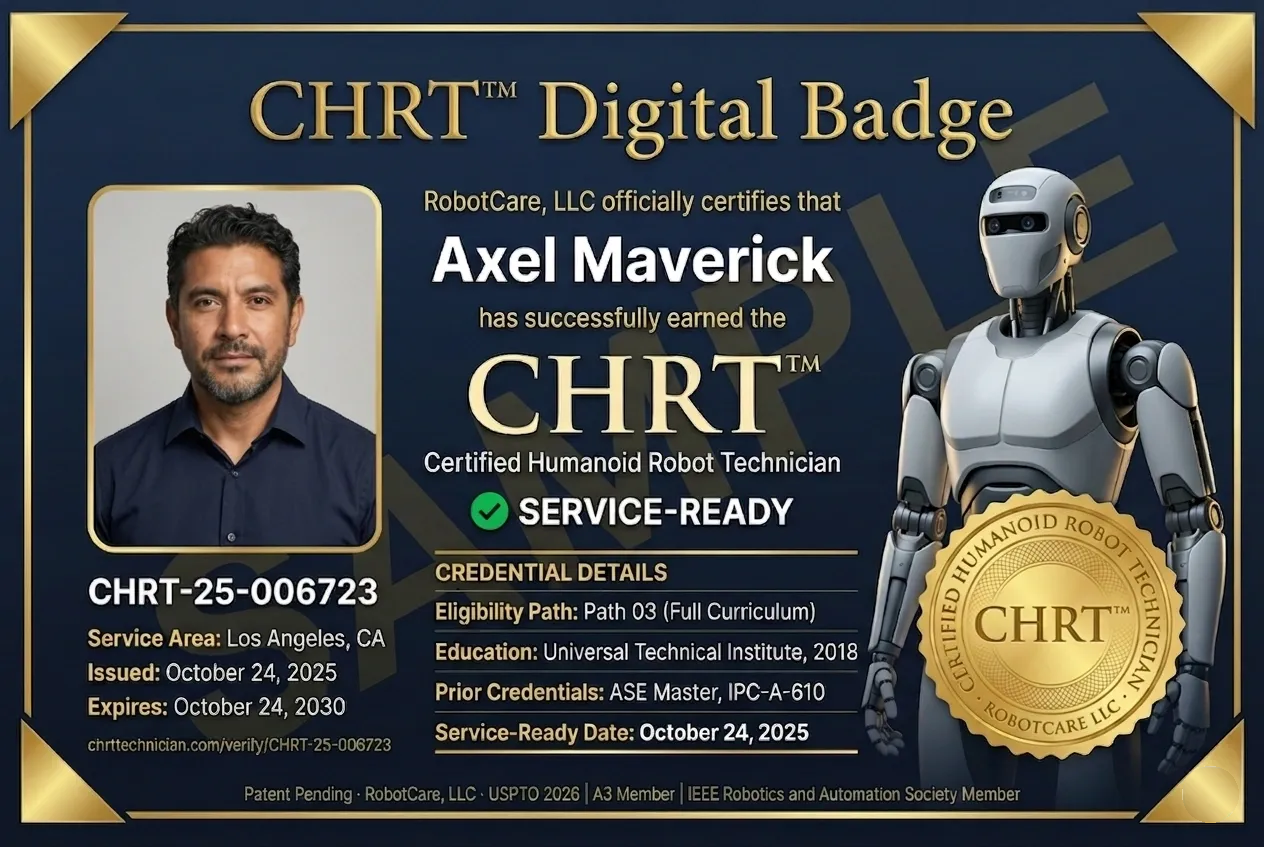
Sample badge · CHRT-25-006723 · Issued for illustration
Live badges issued only to certified technicians
Where to use your CHRT™ Digital Badge
-
LinkedIn Add to the Licenses & Certifications section. Issuing organization: RobotCare, LLC. Credential ID: your CHRT number. Credential URL: chrttechnician.com/verify/your-id.
-
✉
Email Signature Embed as a clickable image linked to your verification URL. Recommended display size 180 to 220 pixels wide. Signals credential authority on every outgoing message.
-
✓
Resume or CV Include the badge image alongside your credential line. Always include the verification URL in printable form so reviewers can confirm without contacting RobotCare.
-
📋
Job Applications & Company Profiles Upload the badge in applicant tracking systems and add the verification URL to your application materials. Employers can verify credential status in real time.
-
RC
RobotCare Network Profile Displayed to fleet operators searching the dispatch directory. Service-Ready technicians appear at the top of fleet-side search results.
-
⬇
Print & Trade Show Use High-resolution PNG suitable for business cards, trade show banners, conference badges, and shop signage. Verification URL renders sharp at any scale.
How to download your badge: Service-Ready technicians can download their personalized digital badge from the Technician Login portal (launching Q3 2026). Each badge is generated from your live credential record, signed by RobotCare, LLC, and re-issued automatically when your status or expiration changes. Patent Pending · RobotCare, LLC · USPTO 2026.
Common questions
Not yet certified?
Begin the CHRT™ certification path at robotcare.app and join the first generation of credentialed humanoid robot technicians.